
Configure the SIFEN operating environment, CSC credentials and digital certificate for the company acting as electronic issuer.
SIFEN configuration is maintained independently for each company managed in EventFlow FE PRO. The taxpayer credentials, certificate and selected environment must correspond to that issuer.
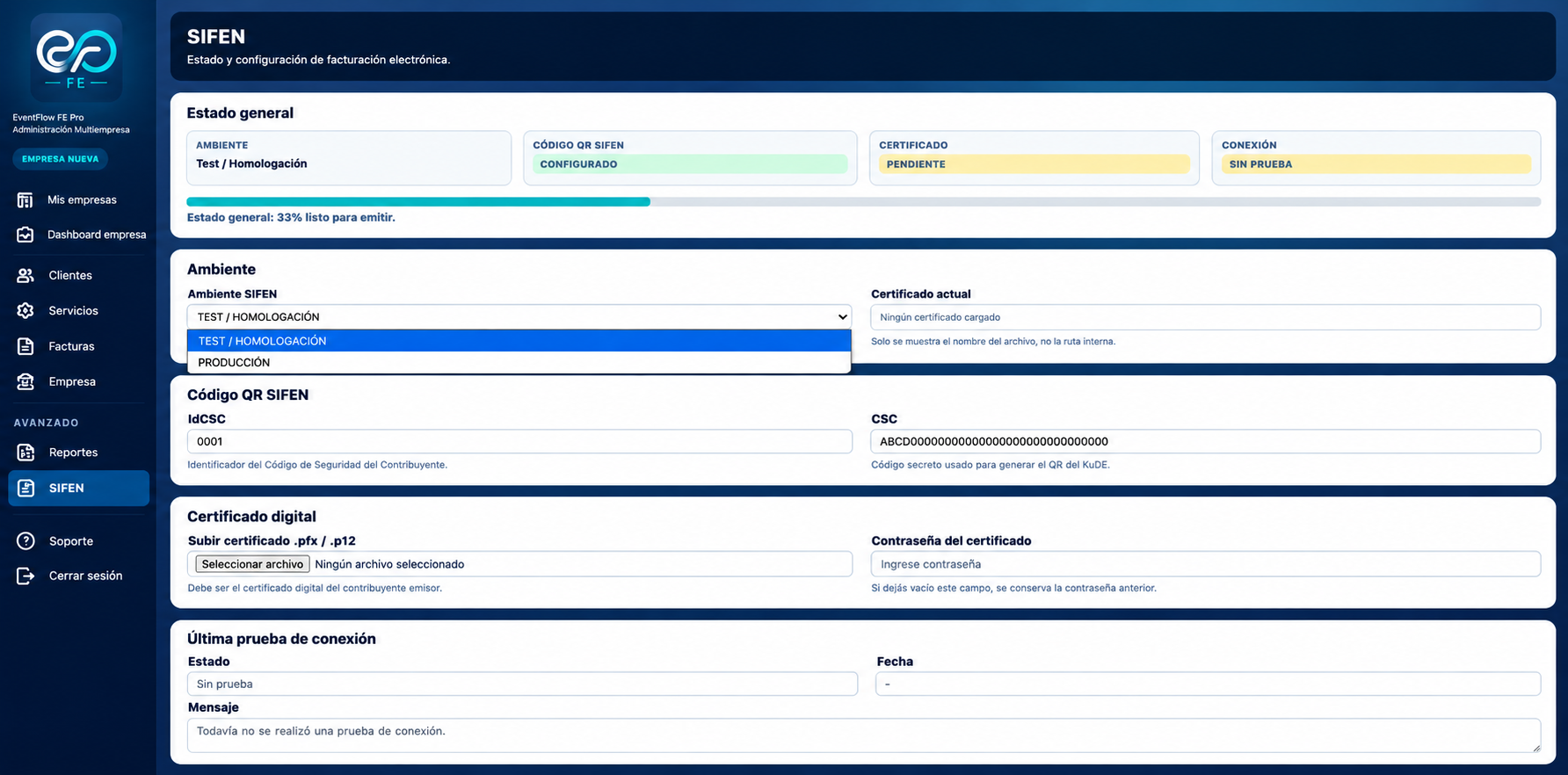
Select the image to open the full-size view.
1. Review the SIFEN configuration status
Open SIFEN from the company workspace.
The General status section consolidates the current configuration for the selected issuer:
- Environment. Active SIFEN operating environment.
- SIFEN QR Code. Configuration status of the IdCSC and CSC used for KuDE QR generation.
- Certificate. Configuration status of the issuer’s digital certificate.
- Connection. Result status of the latest SIFEN connectivity test.
The percentage indicator represents configuration completeness across these controls. It does not represent a fiscal authorization or a SIFEN document result.
2. Select the SIFEN environment
Under Environment, select the SIFEN environment applicable to the issuer:
- TEST / HOMOLOGATION. Used for technical validation and homologation without issuing fiscally valid documents.
- PRODUCTION. Used for fiscal operations with production SIFEN services.
EventFlow FE PRO applies the corresponding SIFEN service endpoints for the selected environment.
The Current certificate field identifies the digital certificate currently associated with the issuer when a certificate has already been configured.
Changing the environment changes the SIFEN services against which subsequent connectivity and fiscal operations are performed.
3. Configure IdCSC and CSC
Under SIFEN QR Code, register the security credentials assigned to the taxpayer:
- IdCSC. Identifier associated with the taxpayer’s Código de Seguridad del Contribuyente.
- CSC. Confidential security code used in the generation of the KuDE QR information.
Both values must correspond to the taxpayer configured as issuer.
These credentials are issuer-specific and must not be reused between companies unless they correspond to the same taxpayer configuration authorized for that issuer.
4. Configure the digital certificate
Under Digital certificate, upload the certificate used by the issuer for electronic document signing.
EventFlow FE PRO accepts certificates in .pfx or .p12 format. Enter the corresponding certificate password under Certificate password.
The certificate must be valid for the taxpayer acting as issuer and suitable for the electronic invoicing operation being configured.
When a certificate is already configured, EventFlow FE PRO displays its filename under Current certificate without exposing its internal storage path.
5. Validate SIFEN connectivity
After configuring the environment, IdCSC/CSC and digital certificate, perform the SIFEN connection test.
The Latest connection test records:
- Status
- Date
- Message
A successful test confirms that EventFlow FE PRO can establish the configured connection using the selected SIFEN environment and issuer certificate.
The connection test validates connectivity and certificate use for the configured environment. It does not constitute authorization of a fiscal document. Fiscal authorization occurs only when a document is subsequently processed by SIFEN and the corresponding fiscal result is returned.
SIFEN configuration complete
Once the operating environment, IdCSC/CSC and digital certificate are configured and connectivity has been successfully validated, the issuer’s SIFEN configuration is ready for electronic document processing in the selected environment.
The next operational step is to configure the services invoiced by the company and its billing clients.